


Canvas By Instructure
4.528.37K Reviews
App Specs
- Version
- 8.10.0
- Updated On
- License
- Free
- Downloads
- 10,000,000+
- Developer
- Instructure
- Categories
- Education
- Platform
- Android, iOS
Screenshots
 Analysis by AppCompare
Ever found yourself tangled in the web of academic assignments, deadlines, and course materials? Well, let me introduce you to Canvas by Instructure. This app is like having your whole school in your pocket, and let me tell you, it’s a game-changer for students and educators alike. I took it for a spin, and here’s what I found out.
Getting Started with Canvas
First things first, downloading Canvas by Instructure is a breeze. Available on both Android and iOS, you just need to hop onto your respective app store, hit download, and you’re good to go. Once installed, the app greets you with a clean and intuitive interface. It’s like walking into a well-organized classroom, where everything has its place.
Signing in is straightforward. You’ll either log in with your school credentials or create an account if your institution doesn’t already use Canvas. The app is designed to make this process as seamless as possible, which is a huge relief for those of us who aren’t tech wizards.
Features That Make Life Easier
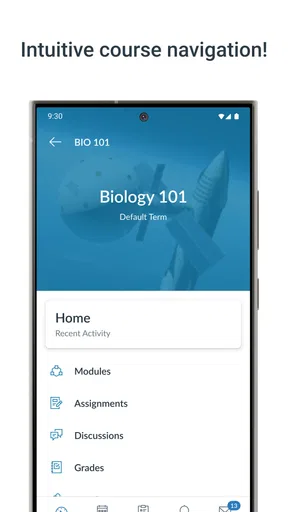
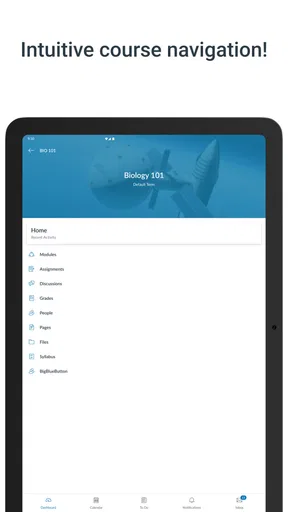
One of the things that impressed me most is how comprehensive Canvas is. It’s packed with features that cater to every aspect of your academic life. Need to check your grades? There’s a tab for that. Want to message your professor? Easy peasy. You can even submit assignments directly through the app, which is a lifesaver if you’re always on the go.
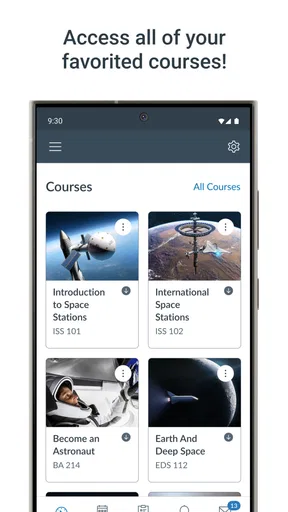
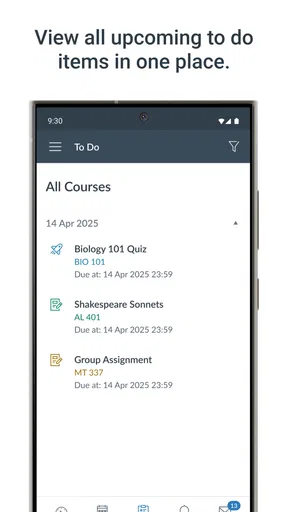
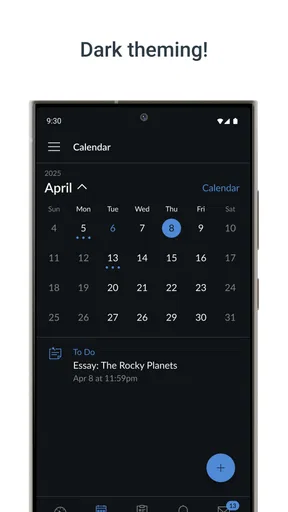
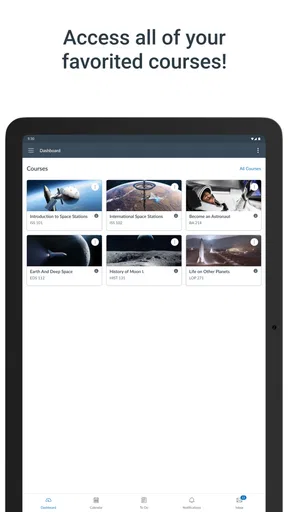
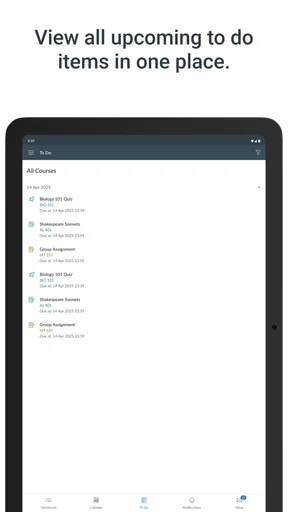
The dashboard is your central hub. It gives you a quick overview of your courses, assignments, and any upcoming deadlines. I found the calendar feature particularly handy. It syncs all your important dates in one place, so there’s no excuse for missing that big exam or forgetting to submit your paper.
Staying Connected
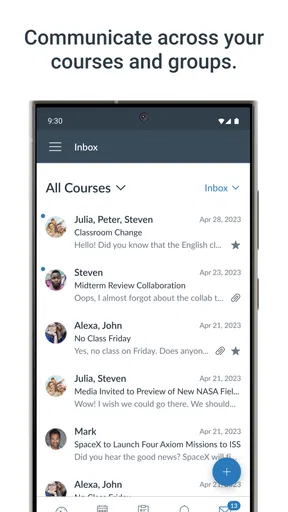
Communication is key in any educational environment, and Canvas has nailed it. The messaging system is smooth and efficient, allowing you to stay in touch with classmates and instructors. Whether you need clarification on an assignment or want to discuss group projects, everything is just a few taps away.
Discussion boards are another great feature. They’re like virtual classrooms where you can participate in discussions, share ideas, and even collaborate on projects. It’s a fantastic way to engage with your peers, especially if you’re part of an online course.
Worth Reading Before You Choose

Flipboard Shows What News Apps Must Do Beyond the Feed

Switching to Android Auto Means Rethinking Your Driving Routine

Google Calendar Makes a Crowded Week Easier to Manage

Ludo King Makes the Most of the Minutes Between Plans

Baby Panda World Brings Quick Play to Modern Phones, but Its Game Library Feels Busy

ESPN’s Live Game View Makes Following Close Games Easier
Customization and Personalization
One thing I love about Canvas is how customizable it is. You can tailor the app to suit your needs. From rearranging your dashboard to setting up notifications, you can make sure you’re always on top of your game. I found the notification settings particularly useful; you can choose to receive alerts for new grades, announcements, or due dates. Trust me, this feature is a lifesaver during finals week.
Accessibility and Ease of Use
Canvas by Instructure scores high in accessibility. The app is designed to be user-friendly, catering to students of all ages and tech abilities. The learning curve is minimal, and if you ever get stuck, there’s a helpful support section with FAQs and tutorials.
The app also supports various languages, making it a versatile tool for international students. Plus, with features like screen readers and high-contrast mode, it’s clear that Canvas is committed to inclusivity.
Final Thoughts
In conclusion, Canvas by Instructure is more than just an app; it’s a comprehensive learning platform that brings your academic world to your fingertips. Its intuitive design, robust features, and focus on connectivity make it an invaluable tool for students and educators alike.
If you’re looking for a way to streamline your educational experience, I highly recommend giving Canvas a try. It’s like having a personal assistant for school, and who wouldn’t want that?
Pros
- User-friendly interface enhances navigation.
- Comprehensive grading tools for teachers.
- Seamless integration with third-party apps.
- Robust communication features for students.
- Regular updates improve app functionality.
Cons
- Occasional syncing issues with updates.
- Limited offline access to course materials.
- Some features can be overly complex.
- Notifications can become overwhelming.
- Initial setup may be confusing for new users.
FAQs for Canvas By Instructure
What is Canvas by Instructure used for?
Canvas by Instructure is a comprehensive learning management system (LMS) designed to facilitate both online and blended learning environments. It offers tools for course management, communication, assignments, and grading, making it ideal for educators and students. The app supports collaboration through discussions, announcements, and integrated multimedia resources.
Is Canvas by Instructure free to use?
Canvas by Instructure is free for individual teachers and students, allowing access to many essential features. However, institutions typically purchase institutional licenses to unlock additional functionalities, including advanced analytics and administrative tools. Users should check with their educational institution to understand what features are available to them.
Can I access Canvas by Instructure offline?
While Canvas by Instructure offers robust online features, offline access is limited. Users can download certain course materials to view offline, but interactive features like quizzes and discussions require an internet connection. The app is primarily designed for online use, so reliable internet access is recommended for full functionality.
How secure is my data on Canvas by Instructure?
Canvas by Instructure prioritizes user data security and privacy. It complies with industry standards and regulations such as FERPA in the U.S., protecting student information. The platform employs secure data encryption and regular security audits to ensure data integrity. Users should review privacy policies to understand how their data is handled.
Can students submit assignments through the Canvas app?
Yes, students can submit assignments directly through the Canvas app. The app supports a variety of file types and offers a streamlined submission process. Students can also use the app to check deadlines, view grades, and receive feedback from instructors, making it a convenient tool for managing coursework on the go.


